Skip to the checker

Runs in your browser · No files uploaded · Never connects to your store

Check and prepare product files for WooCommerce

Check an existing WooCommerce CSV, map a supplier spreadsheet, or prepare price and stock updates. Your catalog file stays in your browser.

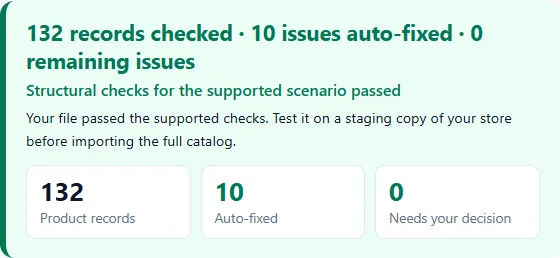
Screenshot of the Check demo result: 132 records checked, 10 issues auto-fixed, 0 remaining issues.
Synthetic demo; no customer data.

For WooCommerce’s built-in CSV importer. Import workflows tested with WooCommerce 11.1.2 — see supported scenarios and limits.

Free check of the whole file · Free sample of up to 50 records · Up to 50,000 records · 50 MB · UTF-8 CSV or Excel

Your catalog file stays in your browser. Payment and restoring a purchase by email talk to our server; so does an optional image URL check, only if you start it (never with your file). See Privacy.

Check your CSV or Excel file

What do you want to do?
Free check — $0 · Whole file & reportFree sample · Up to 50 records, whole product groupsCatalogDock Pass — $19 one-time · 3 full results · 30 days When is it free?

Desktop Tool

CatalogDock works with CSV and Excel catalog files, which live on your computer. Open this page on a desktop or laptop to check and repair your file: it stays on that computer.

Just looking?

Drop your WooCommerce CSV or Excel file here

or

  • CSV (UTF-8 · comma or semicolon)
  • Excel (.xlsx, .xlsm)

Up to 50,000 records · 50 MB

No file at hand?

Your catalog file stays in your browser. No file uploads. Offline: once the checker has loaded (it loads when you point at, tab to or drag a file onto this box), CSV checks keep working without a connection. An Excel file needs the connection to be read.

For the built-in WooCommerce CSV importer: new products, local attributes, SKU links. Global attributes (pa_*) depend on your store and are not verified from the file; the free WordPress plugin can compare them with your store.

Delimiter
Formats and limits
  • A CSV for the built-in WooCommerce importer (Products → Import), UTF-8 with or without BOM, or an Excel workbook (.xlsx, .xlsm, converted to CSV in this tab: up to 3,000,000 cells per sheet and 150.0 MB of decompressed data).
  • Limits per file: 50,000 records and 50,000,000 bytes (50 MB). A record is a CSV record after the header; parents built from a price list count too. Bytes are the actual size of the file.
  • Free: the check of the whole file and a fixed sample of up to 50 records, whole product groups only. Nothing is uploaded: the files are processed in this browser tab.

No file selected.

What it checks and fixes

Three workflows for the built-in WooCommerce CSV importer: prepare a supplier file, check a new catalog and split it into safe batches, or update the prices and stock of products already in your store. Every rule is described in the documentation.

01 · Prepare a new catalog

Prepare supplier file

Turn a supplier’s CSV or XLSX price list into WooCommerce columns, products and variations.

  • Map the supplier’s columnsRecognizes typical supplier column headers in 12 languages (the interface is in English), e.g. Artikelnummer → SKU, Precio → Regular price; you review every match. Headers that name a purchase, wholesale or cost price (such as EK-Preis) are not suggested as the retail price. Save mappings and variation rules as a reusable supplier profile.
  • Clean up valuesTrim spaces and normalize numbers with rules you choose: 1 299,50 becomes 1299.50.
  • Build parents and variationsVariable parents are created from flat rows by a group key you choose, never because names look alike.
  • Take pictures out of ExcelPictures placed on the sheet come as a ZIP with manifest.csv linking them to SKUs; you upload them to your store.

02 · Check and import in batches

Check Woo CSV & Safe Batches

Rules follow the built-in WooCommerce CSV importer (checked against WooCommerce 11.1.2) for new products whose parents and variations are in the same file, linked by SKU.

  • Fixed automaticallyVariations listed before their parent are moved below it, and stray spaces in Parent are removed. SKUs are never edited.
  • Explained for you to decideMissing parents, duplicate SKUs, attribute mismatches and file problems, each with its record and SKU. Nothing is guessed.
  • Variation-safe batchesThe full result includes numbered batches of up to 500 records and IMPORT-ORDER.txt; a parent stays with all its variations. Smaller imports reduce the risk of a 504 timeout but cannot rule it out.
Before
Type,SKU,Parent,Attribute 1 name,Attribute 1 value(s)variation,TEE-S,TEE,Size,Svariable,TEE,,Size,"S, M"variation,TEE-M,"·TEE",Size,M
After
Type,SKU,Parent,Attribute 1 name,Attribute 1 value(s)variable,TEE,,Size,"S, M"variation,TEE-S,TEE,Size,Svariation,TEE-M,TEE,Size,M

The parent TEE moved above its variations, and the space in " TEE" was removed. Prices, stock, descriptions and unknown columns are left exactly as they were.

Full specification in Docs

03 · Keep an existing catalog up to date

Update catalog

Handle weekly price and stock changes without importing the whole catalog again.

  • Match by SKUCompare the new price list with a fresh store export; missing or ambiguous matches are reported. Nothing is created or deleted.
  • Write only what changedRegular price, Sale price and Stock, in files that hold SKU and just the columns they update.
  • Keep your store content intactDescriptions, images, categories and reviews are not written. Import with “Update existing products”.

Sample report

Generated by this checker from a synthetic demo CSV (fictional products, 132 product records) with problems the tool fixes by itself: variations listed before their parent and stray spaces in Parent. After 10 automatic fixes no blocking problems remain; the free sample holds 50 of the 132 records. No customer data.

Open sample reportDownload demo CSV

Pricing

Checking is free. A CatalogDock Pass is a one-time purchase, only for large results this website changed or built. The WordPress plugin is free.

Free web check — $0

  • Check the whole file, up to 50,000 records and 50 MB: every problem with its record and SKU, the HTML and JSON reports.
  • A free corrected sample of up to 50 records, whole product groups only (it can be smaller, or missing when every group is larger or still has problems). Try it on a staging copy of your store.
  • Update catalog: the comparison is always free; the update files are free for up to 50 changed products in total.
  • It checks only the files you give it; it cannot see your store’s global attribute settings.
Check a file

CatalogDock Pass — $19 one-time

3 full results · 30 days · No subscription

  • Up to 3 different full results within 30 days, up to 50,000 records each: a large corrected or prepared catalog, or update files for more than 50 changed products.
  • Each result comes as the full CSV, a UTF-8 BOM copy and import batches of about 500 records (a product group is never split).
  • Downloading the same result again during the 30 days uses no new result.
  • Paying never fixes a problem that needs your decision: a full result exists only when no problem remains.
Check your file for freeSee your result before you pay.

14-day money-back guaranteeFull refund on request, no reason needed.

Before you buy, read the Terms of Service, Privacy Policy and Refund Policy.

Free WordPress plugin — $0

  • Works inside WordPress admin (Products → CatalogDock) for users who can edit products. No Pass, no account.
  • Checks a file, compares it with your store’s products, global attributes and terms, and builds price and stock update files.
  • Uploads the Excel pictures you choose to the Media Library.
  • Full corrected CSV downloads are free, within the same 50,000 records and 50 MB per file.
When is the full download free?
  • The whole corrected result fits in the free sample (all records, whole groups): the full file, its BOM copy and batches are free.
  • “Check Woo CSV” finds nothing to change: your original file is free in full, byte for byte, whatever its size. Import batches of such a file are an optional Pass service; the original itself never needs one.
  • The published Check demo file is free in full. The Prepare and Update demos follow the ordinary limits (they are small, so they are free).
  • Update catalog: the update files are free while they change at most 50 products in total over all files.
What counts as one result?
  • One prepared or corrected catalog is one result, whatever formats you download: its CSV, the UTF-8 BOM copy and the ZIP of batches are the same result.
  • Downloading the same result again during the 30 days of the pass uses no new result.
  • A changed file or different settings give a different result, which can use a new one.
  1. Check your file for free and review what the full result contains (“What you get”).
  2. Buy online (payment by Paddle). The page confirms the payment with our server.
  3. Download the full result. Downloading the same result again is free during the 30 days.

FAQ

Which CSV files are supported?

Use “Prepare supplier file” for non-standard supplier columns (it recognizes typical supplier column headers in 12 languages; the interface is in English), “Check Woo CSV” for a file already in WooCommerce columns, or “Update catalog” for price and stock changes by SKU. CSV must be UTF-8, with a comma or semicolon delimiter. Each file can contain up to 50,000 records and 50 MB; generated parents count toward the record limit.

The structural check supports new variable products with their variations in the same file, parents referenced by SKU and local attributes. Global attributes, “Any” variations and references by database ID need checks outside this workflow (the free WordPress plugin compares global attributes and terms with your store). Output is for Products → Import, the built-in WooCommerce importer, not WP All Import or other importers.

Can I use an Excel workbook instead of CSV?

Yes: .xlsx and .xlsm. Choose the sheet, header row and range, preview the rows and optionally skip hidden rows. Formula cells use their saved values; formulas are not recalculated, macros are never run and external workbook links are not followed. Old .xls, .xlsb, .ods and password-protected workbooks are not supported.

Do I have to set up the same supplier every week?

Save your column mapping, cleanup rules and variation grouping settings as a reusable supplier profile in this browser. Profiles can also be exported and imported as JSON to move them to another browser. They contain settings, not product rows. If the supplier changes the headers, review the detected changes and confirm the mapping again. A downloadable mapping log shows which cell values were changed.

Will Excel pictures appear in my store automatically?

No. Download the pictures placed on the selected sheet as a ZIP with manifest.csv, which links each resolved picture to its row and SKU. Review ambiguous matches; unresolved pictures are flagged without a SKU. Upload the pictures to your media library or image hosting yourself, then fill the Images column with filenames or public URLs. “Place in Cell” pictures and pictures generated by Excel’s IMAGE formula are not extracted.

The Images report also distinguishes web URLs, media-library filenames and local file paths. Recognizing a URL is not proof that the image is reachable or that WooCommerce can download it.

How do safe batches help with import timeouts?

The import ZIP contains numbered CSV files and IMPORT-ORDER.txt. Import them in that order. The target is 500 records per batch; a parent and all its variations stay together, so a single group larger than 500 remains in one larger file. Smaller imports reduce the risk of a 504 Gateway Timeout, but cannot guarantee that your hosting will complete an import.

What can Update catalog change in my store?

Compare a fresh export from the same store with the supplier’s new price list. Downloads contain only SKU and changed Regular price, Sale price or Stock fields, in separate files for each set of changed fields. Descriptions, images, categories and reviews are not written. Empty cells keep current values by default; only Sale price has an explicit option to clear it. Zero is a value, not an empty cell. Missing products are not created, deleted or set to zero stock.

Review the comparison report, then import with “Update existing products” enabled. The tool does not connect to your store or run scheduled syncs: you export, compare and import each time. It does not switch stock management or backorder settings. Update files also come as a ZIP of parts of up to 500 records, with import instructions. Downloading update files is free for up to 50 changed products; updates with more than 50 changed products use the CatalogDock Pass.

Is my file uploaded to a server?

No. Files are read and processed by JavaScript in your browser tab (in a background worker). The page does not send their contents anywhere and has no analytics scripts. The contact buttons only open your email app; they never attach your file. Online purchase sends an order number, your access key and the SHA-256 fingerprint of the result to our server. If the optional network image check is enabled and you start it, image URLs are sent too. See the Privacy Policy for payment and data details.

What is included in the free sample?

For “Prepare supplier file” and “Check Woo CSV”, up to 50 records of the result, as whole groups: a parent with all of its variations (generated parents included), or a standalone product. A group larger than 50 records is never cut, so it cannot be in the sample; the page says so. Only groups that pass every check after the automatic fixes are included, and the sample is re-checked before download. The report covers the whole file. If the sample holds the whole result, there is nothing to buy. If “Check Woo CSV” finds nothing to change, your original file is free to download in full, byte for byte, whatever its size.

What should I do about problems the tool does not fix?

Each one is listed with its record number, SKU, field and a recommended action. Correct them in your source data and check again. Full processing applies the automatic fixes to the whole file; problems that need a decision stay your decision, and the report shows exactly where they are. Unsupported scenarios are valid WooCommerce features this tool cannot verify from the file — test them on a staging copy of your store.

Is there a companion WordPress plugin?

Yes. CatalogDock — CSV Repair for WooCommerce is free on WordPress.org. It runs in your WordPress admin (Products → CatalogDock); the file is processed in your browser tab and not uploaded anywhere.

Every plugin feature is free, with no pass: file checks, comparison with your store’s products, global attributes and terms, price and stock update files, upload of chosen Excel pictures to the Media Library and full corrected CSV downloads, within the same 50,000 records and 50 MB per file. This website is for work outside WordPress: mapping supplier price lists (headers in 12 languages), building parents and variations from flat rows, reusable supplier profiles and import batches. See plugin or website.

Does a passing check guarantee the import will work in my store?

No. It confirms the structural checks for the supported scenario. The import workflows were tested with WooCommerce 11.1.2 (on WordPress 7.1.2); other versions were not tested, which does not mean they fail. When building parents and variations, you can supply a store export or SKU list to detect conflicts with existing SKUs. This checks the supplied snapshot, not the live store. Global attribute settings, database collation, plugins, server limits, image availability and the importer’s column mapping still need checking. Always test on a staging copy first.